
 David Hacker
A call comes in at 4:58 on a July Friday. "The upstairs unit stopped cooling. Can someone come out tonight?" What happens in the next ninety seconds decides whether that is your service ticket or somebody else's, and almost none of it is about your technicians.
Here is that call followed all the way through, with the thing that does each step named rather than implied.
What usually happens to it
Two minutes past five is the worst possible moment for a phone. The office phone is on its after-hours greeting. Whoever is out on a call has their personal mobile in a pocket, on a roof, under a truck. The caller leaves a voicemail or, more often, does not — they hang up and dial the next name in the search results, and by the time anybody hears the message, that job belongs to somebody else.
The frustrating part is that this is not a staffing problem. The customer is not asking for a technician right now. They are asking to be told what happens next, and they will wait a surprisingly long time for a real answer. They just will not wait in silence.
The three things that should happen instead
Every one of those calls, at nine in the morning or nine at night, is one of three outcomes. Booked, paged, or written down. The HVAC page draws it as a single flow with three branches, and the flow itself does not change with the clock — the only thing that changes is what counts as "now".
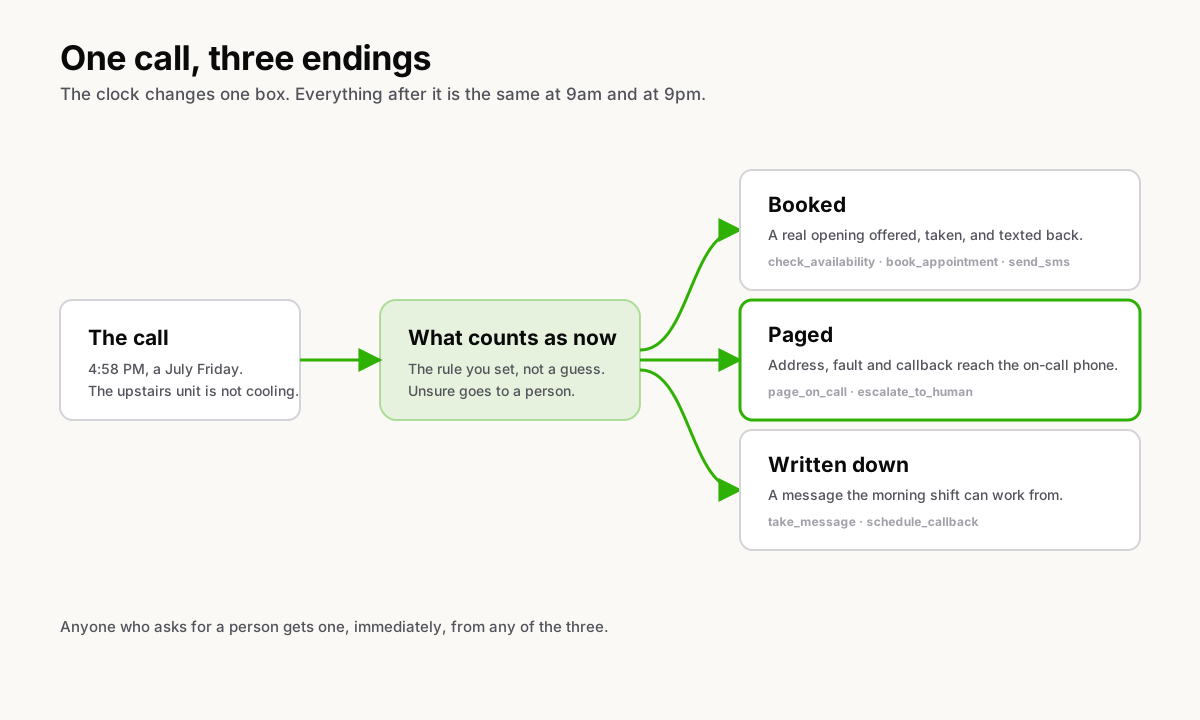
Booked. The receptionist checks your calendar, offers openings that
genuinely exist on it, books one, and texts the caller a confirmation. Four
things in that sentence, and they are four separate tools: check_availability
reads the calendar, book_appointment writes to it, send_sms sends the
confirmation from your business number, and the caller ends the call with the
day and time in writing, which is the version people actually keep.
Paged. When the call is genuinely urgent, the address, the fault and the
callback number reach the on-call phone before the caller hangs up. That is
page_on_call, which rings the whole on-call rotation, with escalate_to_human
behind it for a caller who is upset, asks for a person, or describes something
the receptionist was not taught to handle. Someone who asks for a human gets
one, immediately, with no menu to argue with.
Written down. Not urgent, out of your service area, or past the cutoff you
set: take_message captures the fault in the caller's own words and
schedule_callback puts it on the morning list. Not a voicemail somebody has
to transcribe at seven the next morning. A written message the morning shift
can work from as it stands.
How it tells an emergency from a routine call
By the rule you gave it, not by a guess.
You decide what counts as an emergency for your business — no cooling with somebody elderly in the house, water where water should not be, a burning smell, a breaker that keeps tripping — and the receptionist follows that rule. It asks for the fault in the caller's own words rather than reading them a menu, and it asks whether anyone in the house is at risk from the heat, because in a Florida July that is the question that changes the answer.
When it is unsure, it goes to a person. That is deliberate and it is the safe direction to be wrong in: a routine call that pages you is an annoyance, and an emergency that became a voicemail is a lost customer and possibly worse.
What it will not do on this call
The limits are the reason the rest of it is worth having.
It will not quote a repair price. It will give a diagnostic fee if you gave it one, and nothing else — no estimate, no guess at a part, no "probably around a thousand". It will not promise a time window you have not set. It will not diagnose the unit over the phone, and it will not bluff its way through a technical question to sound helpful. When a caller pushes for a number it does not have, it says a person will call back with it and takes the details.
It also says what it is at the start of the call. On an inbound call it answers, it opens by telling the caller they are speaking with an automated assistant, and that the call may be recorded, before anything else happens. That opening line is fixed. You can add your own words around it, but you cannot remove it, and I would not build it any other way.
One honest limit on that. The opening disclosure is locked; there is not yet a locked rule for what the receptionist says if a caller asks mid-call whether they are talking to a machine. So do not read the paragraph above as a promise that it announces itself again later in the call. The full list of what it can and cannot do is in what an AI receptionist will and will not do.
Setting it up
Four steps, and none of them is a rip-and-replace.
- Keep your number. We port it, or we forward the one you have while the port runs, so nothing on your van or your sign changes.
- Tell it the business. Service area, hours, what you charge to come out, what you do not do, and who is on call this week.
- Point the emergency path at a phone. An extension, a ring group, or the on-call rotation — whichever your crew actually answers. Ringing a group of extensions and routing by time of day are the two pieces here.
- Put the softphone on the truck. The same extension in the browser at the shop and on the phone in a technician's pocket, so the callback comes from the business number rather than somebody's personal mobile.
Two locations work the same way. Each gets its own number, greeting, hours and crew, under one login and one bill, with reports split by location.
And the week the storm comes
The same flow is what a hurricane plan looks like for an HVAC company, which is convenient, because the week after a storm is when the phone rings hardest. None of this lives in your building, so the office losing power stops being a phone event, and the routing you already wrote keeps running while you are somewhere else entirely. The one thing worth doing in advance is the part that takes five minutes on a normal Tuesday and is impossible during an evacuation — the whole checklist is here.
Where to start
If you run an HVAC company in Florida and you want to see what your own after-hours call would do, that is half an hour with me. We look at how the calls come in today, I show you the flow answering live, and you decide whether the three endings above are the right three for your business. Book a time. If you want to read the short version first, it is on the HVAC page, and the same shape covers plumbing, electrical and the rest of home services.
Got a topic you want covered? Email hello@heyquad.com.