
 David Hacker
An AI receptionist is only worth having if you know exactly where it stops. I wrote the tools mine can use and the rules it runs under, so this is the list from the code rather than from a brochure: what it does, what it refuses, when it hands a call to a person, and what it is genuinely bad at.
What it is, and what it says first
It is an automated assistant that answers inbound calls on your number, in your business's name, using the hours, services and answers you gave it.
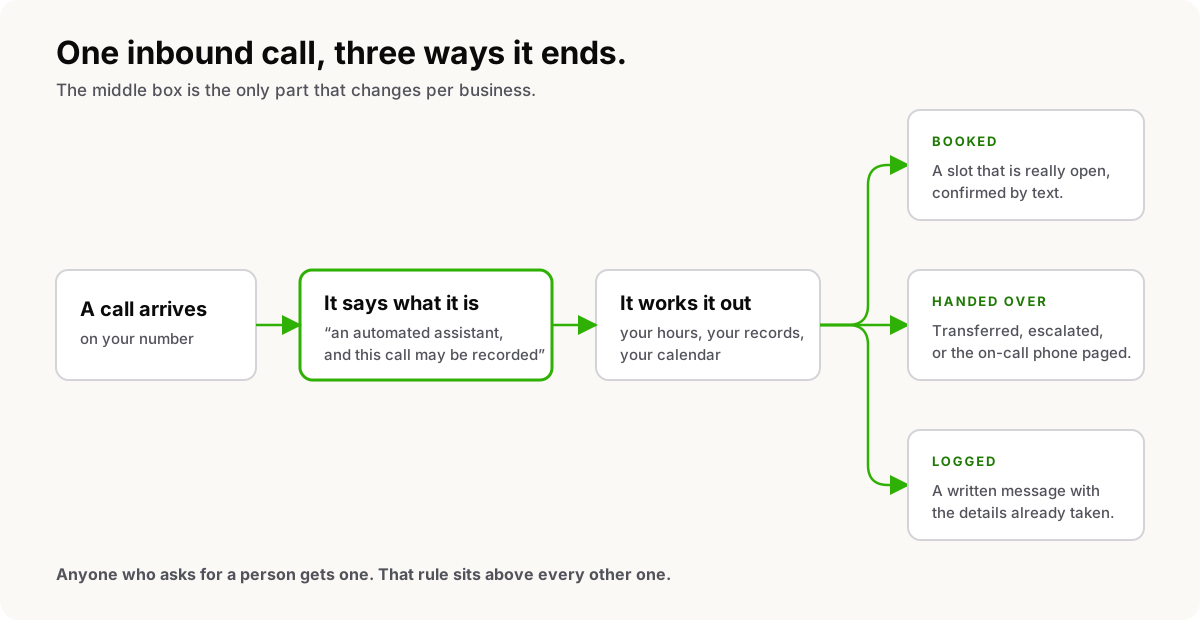
It says so at the start. On a call that routes to it, the caller hears one locked sentence before anything else: you are speaking with an automated assistant, and this call may be recorded. A business can add words around that line, a name or another language, but not remove it, and the core wording is the same for every business on the platform.
One honest gap while I am here. The opening disclosure is locked. What it should say mid-call if somebody interrupts to ask whether they are talking to a robot is not yet written into the rules, and until it is I am not going to claim it always answers that question the same way.
What it can do
Every item below is a real tool the assistant can call while the caller is on the line. Nothing here is a roadmap.
- Answer from what you taught it. Hours, services, address, parking, what you charge to come out, what you do not do.
- Take a message. It collects the name, a callback number and the actual message before it files anything, rather than recording the fact that somebody wanted to leave one.
- Recognise a returning caller. It looks the number up in your address book and greets a known caller by name instead of making them start over.
- Check whether you are open, against the schedule you set, holidays included, so an after-hours call stops being transferred into an empty office.
- Check the calendar and book. It offers times that are genuinely free, books the one the caller agreed to, and texts the confirmation.
- Find, move or cancel an appointment the caller already has.
- Text the caller from your business number. A confirmation, an address, a link.
- Find the right person. It searches your directory by the name or department the caller said, gets the extension, and can see whether that person is on another call or offline.
- Transfer, to an internal extension or to an outside number.
- Escalate, to a person, to a queue with hold music, or to the on-call rotation.
- Page the on-call phone without moving the call, and stay on the line with the caller while it does.
- Take a lead, file a ticket, or schedule a callback for the team to work.
- Say goodbye and hang up, in that order. It is not allowed to end a call in silence.
What it will not do
This is the half that matters more, and it is enforced in the instructions the model runs under on every single call.
It will not invent a fact, a name, a price or an availability. If neither a tool nor what you taught it has the answer, the rule is to say it does not have that information and offer to take a message. It will not estimate a repair, guess at a part, or promise a window you never set.
It will not tell a caller something worked when it did not. Every tool call comes back with an explicit verdict, failures included, and that design exists precisely so this rule has something to fire on. If a booking or a text or a transfer fails, saying it succeeded is forbidden. It has to acknowledge the problem, take a name and a callback number, and tell the caller somebody will ring back.
It will not read your records out to an unverified caller. Sensitive actions can require identity confirmation first: a one-time code texted to the number on file, or security questions. The assistant never sees the correct code or the right answers, because the checking happens outside the model, which only gets a pass or a fail. It is not allowed to claim somebody is verified when the check did not say so, and if verification keeps failing it offers a message or a transfer rather than a workaround.
It will not stop being the receptionist. It is pinned to one role, answering an inbound call for your business, and it will not role-play as the caller or take a caller's instruction to become something else.
When it hands off, and what that means
Anyone who asks for a person gets one. That rule sits above every clever thing in the list above.
Beyond that, the handoff happens the moment the call stops being routine: the caller is upset, the request is outside what you taught it, or it is a judgement call like a quote or a negotiation. What happens next depends on what you pointed it at.
Transfer puts the caller through to an extension or an outside number. It checks the directory first, so when the person is on another call it can offer a message instead of transferring into silence.
Escalate sends the caller down your escalation path, which is a person, a queue with hold music, or the on-call rotation. The assistant leaves the call at that point, so it says what is about to happen first.
Page alerts whoever is on call without moving the caller anywhere. The assistant stays on the line and still takes the callback details, which is the version you want at eight in the evening.
One thing worth knowing about a transfer: whoever picks up gets a briefing on screen the instant they answer. Who is calling, what they want in a sentence, the facts already collected, how the caller sounds, and what to do next. The caller does not repeat themselves to the human.
What it sounds like
There is a recording of it answering a call on the front page. That recording is a scripted illustration, not a customer's call. There is no customer recording on this site, because publishing one would mean publishing somebody's phone call.
The industry pages go further for a handful of trades: the specific call, the specific outcomes, and which of the tools above produce each one.
What it costs
The receptionist is a tiered add-on with its own pool of minutes. Time spent with the assistant comes out of that AI pool, and the same seconds are taken off your regular voice pool, so nothing is billed twice.
As of September 2026 there are three tiers, each billed monthly, each with a monthly pool of receptionist minutes and a per-minute rate past the pool.
| Tier | Per month | Included minutes | Past the pool |
|---|---|---|---|
| Starter | $49 | 200 | 45 cents a minute |
| Growth | $149 | 400 | 40 cents a minute |
| Pro | $349 | 1,000 | 35 cents a minute |
In prose, because the audio player skips tables: Starter is forty-nine dollars a month for two hundred receptionist minutes, then forty-five cents a minute after that. Growth is one hundred and forty-nine dollars for four hundred minutes, then forty cents. Pro is three hundred and forty-nine dollars for a thousand minutes, then thirty-five cents. One tier is active at a time. How AI minutes work has the detail, and the pricing page is the live version if you are reading this months from now.
The phone system underneath is priced separately, per seat. The receptionist is an add-on to a phone system, not a replacement for one.
What it is bad at
Noise and crosstalk. A busy kitchen, a job site, a speakerphone in a truck, two people talking at once. Speech recognition degrades exactly where you would expect it to, and a caller who has to repeat themselves twice is a caller you have annoyed.
Strong accents, for the same reason.
Anything you did not teach it. It is not clever about your business, it is accurate about what you told it. A thin setup produces a receptionist that takes a great many messages.
Judgement. It is not a nurse line, a legal advisor or a diagnostician, and I would not point it at a call where being wrong is dangerous. Its emergency rule is the one you wrote, and anything it is unsure about goes to a person, because that is the safe direction to be wrong in.
I am also not going to publish an answer rate, an accuracy percentage or an average handle time, because I have not measured any of them well enough to stand behind them. When I have, they will be here with the method attached.
Where to start
If you want to hear what it would say for your business, the fastest route is a conversation about what it should and should not be allowed to do. That conversation is with me. Book a time.
Got a topic you want covered? Email hello@heyquad.com.