
A calm first step for the call that decides whether they hire you.
Someone who just opened a letter with a deadline on it calls three firms. The one that answers is usually the one that gets the matter. Hey Quad answers every time, takes intake properly, and is careful about the one thing a phone must never do in a law office: give advice.
“I received a notice today and I’m not sure how quickly I need to respond.”
Nobody is free to pick it up. That call is the whole argument for the rest of this page.
What Quad says, and what it does
- Answers in the firm’s name and does not make the caller repeat themselves later.
- Takes intake: name, callback number, email, how they found you, the type of matter, and the deadline if there is one.
- States clearly that it cannot give legal advice, and does not attempt any — no opinion on the deadline, the merits, or what they should do next.
- Routes by matter type to the right attorney or paralegal, or books the consult if that is how you run intake.
When a person takes over
Existing clients asking about their own matter, anyone in genuine distress, and any caller who asks for a person are transferred immediately. New matters reach a human before anything that looks like advice is needed — Quad’s job ends at a complete, accurate intake. Conflicts checks stay with your people; the phone gathers the names, it does not clear them.
The actual flow
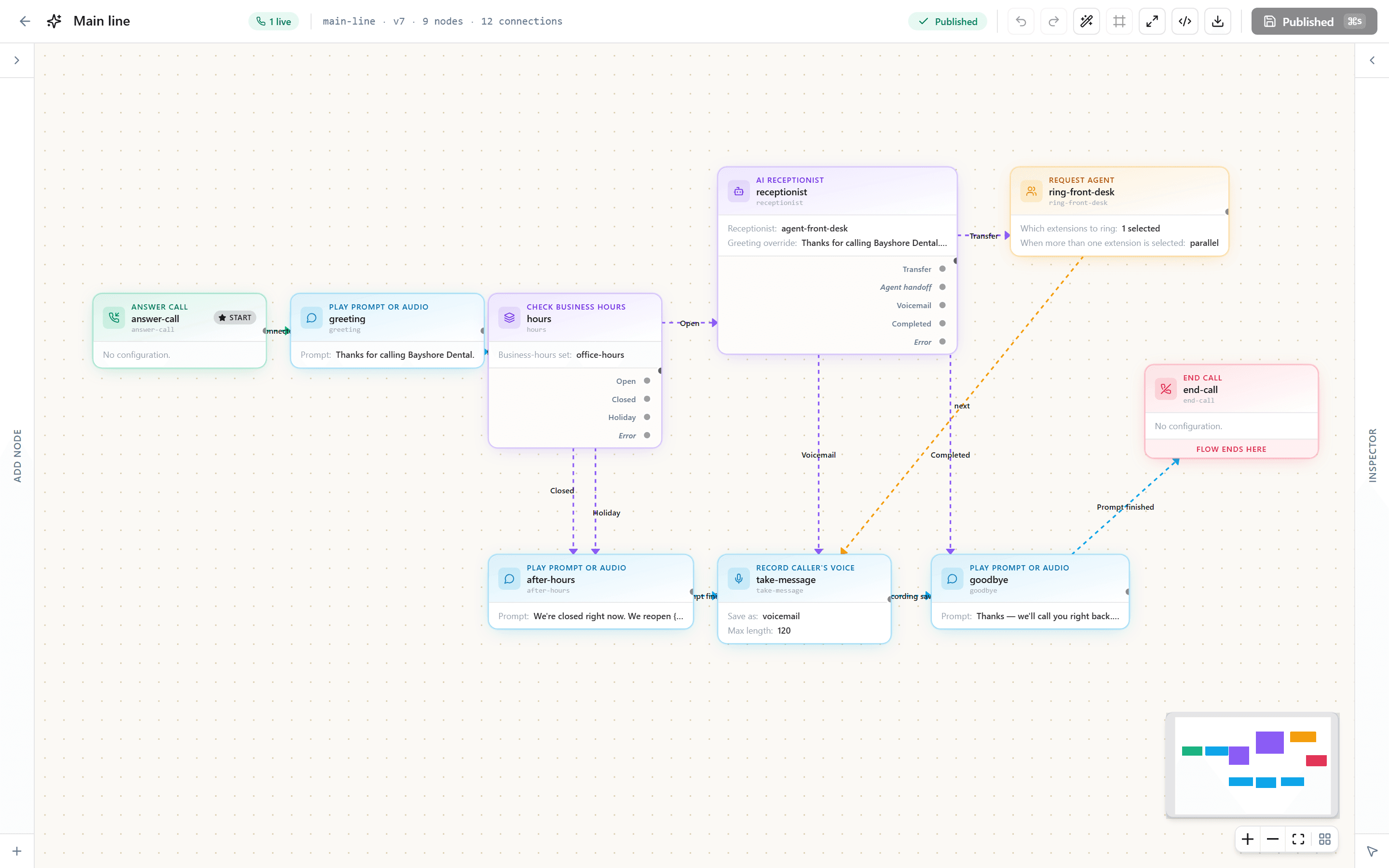
Not a diagram of a product vision. This is the shape of the call flow you get on day one — hours and holidays at the front, the receptionist in the middle, and three ways a call can end.
And this is where it lives. The same flow, open in the editor you get on day one — every branch above is a box you can move, rename or point somewhere else, without calling us.
What setting it up looks like
- Keep the firm’s number and add a direct line per attorney if you want them.
- Teach Quad the practice areas you take, the ones you do not, and the referral answer for the ones you turn away.
- Set the routing: which matter types go to which extension, and what happens after hours.
- Decide the recording posture. Off by default; if you turn it on, retention is yours to set.
David does this part with you on a call. Not a ticket queue, not a wizard you work through alone.
What it costs
$30 per seat per month, with Florida communications services tax already inside that number rather than added at checkout. A seat is a person, not a device.
- Per seat, per month
- $30Florida tax included
- Calling minutes
- 3,000per seat, pooled across the team
- Text messages
- 250per seat, pooled; inbound free
- AI receptionist
- from $49its own pool of AI minutes
Get your price
Tell us about your business and we will show you the price on this page. If you are outside Florida we will say so and take your details for when we open your state.
Tell us about the business
Questions firms ask
- Will it give legal advice?
- No. It is instructed not to and says so on the call. It takes the facts down and gets the caller to a person. If a caller pushes, Quad repeats that it cannot advise and offers the soonest real time with someone who can.
- Can it screen out the matters we do not take?
- It can ask the questions that separate them and route accordingly — including a polite decline with the referral line you wrote, so the caller gets somewhere useful instead of a dead end.
- What about confidentiality?
- Call recording is off unless you enable it, retention is configurable, transcripts live in your account under the same tenant isolation as the rest of your data, and the subprocessors we use are published rather than described in general terms. Read the security page before you decide, not our word for it here.
- Does it work for a solo practice?
- That is the case it fits best. One seat, one number, and a receptionist that answers while you are in a hearing — no staffing decision required to stop missing intake calls.